

The guest journey
1 – The guest connects to an open network
2 — The captive portal opens for authentication and connection speed selection
3 — Internet access is granted at the site’s standard or selected speed
4 — The guest sees marketing content or the provider’s website
Why it is needed
Authentication and access control support:
— Connection management to prevent overload
— A better guest experience through convenient access and relevant offers
— Revenue from premium speed plans and guest service tiers
— Guest insight that helps tailor services
– Comply with the requirements of the law (No. 97-FZ, according to which access to the public network is possible only after identification, in addition, you will be obliged to save data on the connection of users (for example, IP addresses and MAC addresses of devices) for 12 months and provide to the request of state authorities).
All open access points must have authorization. There are no exceptions to the rule.
Types of authorization
The implementation depends on objectives and budget. Options range from workarounds to dedicated software, managed services, or specialized equipment.
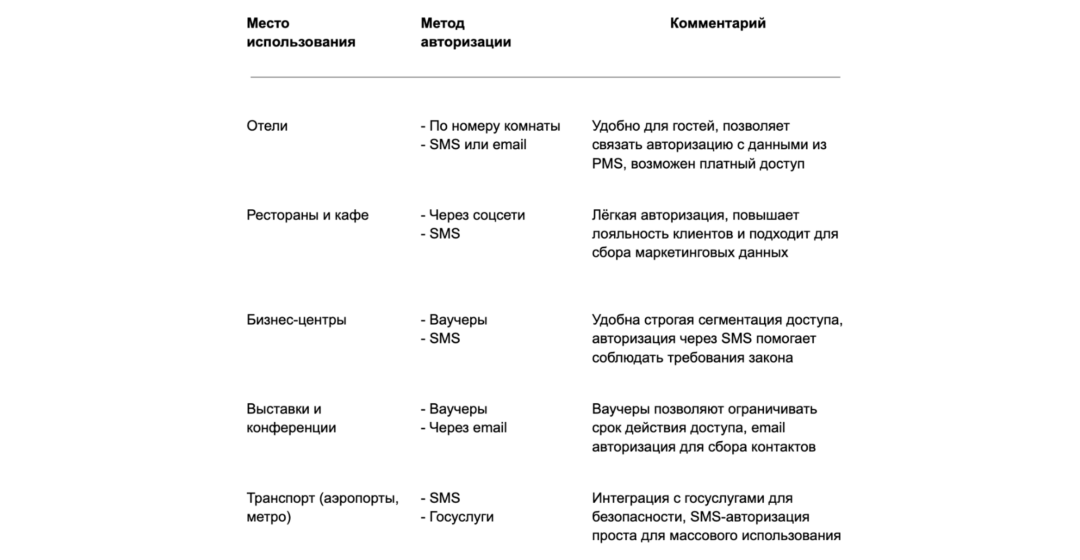
Authorization can be configured through:
— SMS (top for small establishments, cafes and recreation areas. But you need to pay for SMS, set daily limits so as not to get dozens of authorizations from a sudden influx of bots)
— Phone call (ideal for large sites with high flow, cheaper than SMS)
— Social networks or email (gives network owners statistics on the audience, but in Russia this method does not fully meet the legislative requirements, so it is often used in combination, for example, with SMS)
— Gosuslugi (ESIA) (for public institutions, museums, one of the safest and most legally appropriate methods)
— Vouchers: staff issue individual usernames and passwords
— An authentication portal: suitable for hotels, health resorts, and larger sites, with configuration and system integration.
The following checklist outlines the main setup steps.
A short system setup checklist
1. Estimate the number of users and coverage area
2. Select compatible equipment, such as Ruckus Wireless, MikroTik, or Cisco Meraki. Connectum works with more than 100 hardware and software vendors.
3. Set up an identification system through services (e.g. HSMX with integration into Opera/Fidelio and other PMS for hotels)
4. Add the ability to brand the authorization page or use advertising materials
Select the platform for the objective. Analytics may require data collection features; stronger security may involve DPI and RADIUS integration.
Conclusion
The guest experience remains central. The system should be clear, stable, and consistent in speed.
Connectum has deployed guest authentication at more than 100 sites, including international hotel chains, large health resort grounds, business centers, terminals, and lounges.
We are with you before, during and after the project. Technical support is available 24/7. The call will be received by a live operator, not an answering machine, both staff and your guests can apply.
We are a licensed telecommunications operator (licenses No167312 and No167313). We also connect customers to our own guest Wi‑Fi authentication system, configured and branded for their requirements.
To configure guest Wi‑Fi authentication, discuss the task with our engineer, who will recommend a suitable solution.